System[Game-Guide] Server Transfer
2024-09-26 10:57
This is Darkgamer Game Guide.
You may check detailed explanation below.
※ Moonlight Sculptor: Darkgamer can be played on both Mobile and PC, This guide is based on PC Version.

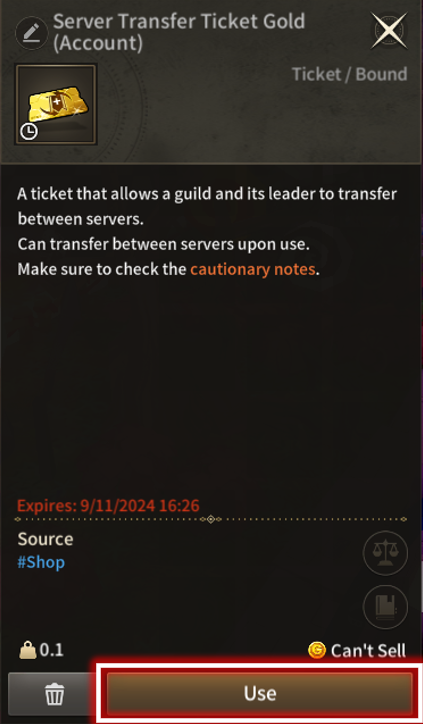
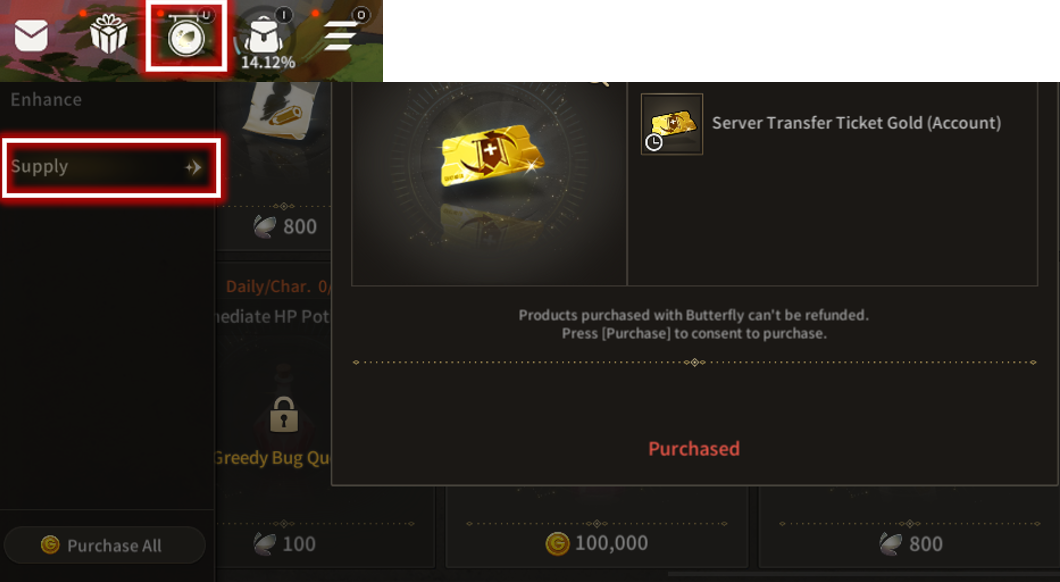
- Click on the game's upper right icon [Shop] - [Daily] - [Supply] to purchase [Guild Server Transfer Ticket Gold].
- Purchase and Use condition is the same as Character Server Transfer Ticket.
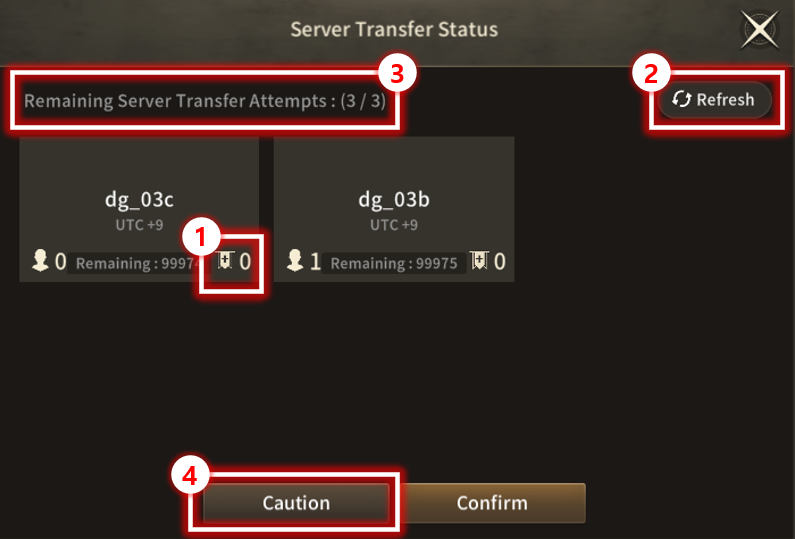
- Can be checked through [Server Transfer Ticket] product's magnifying glass at shop.
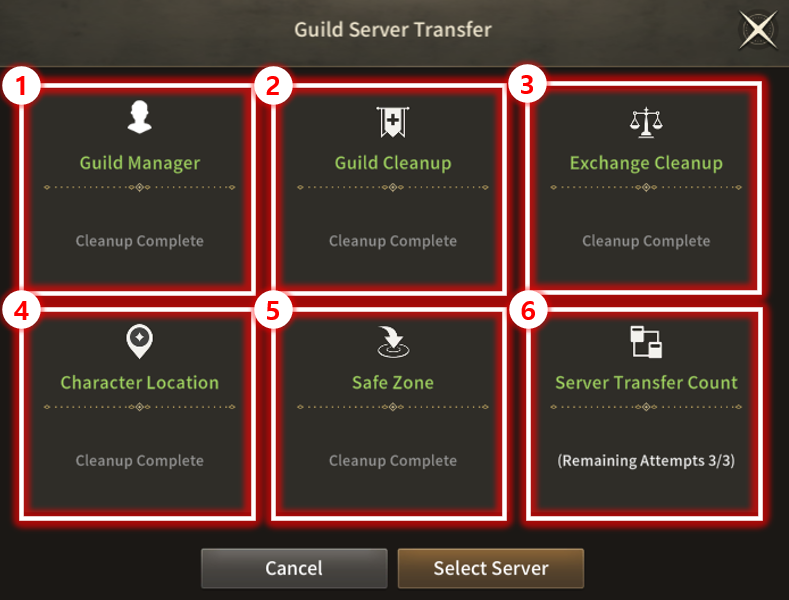
- The UI shows list of requirements for Server Transfer on use.
- Guild Conditions are added/changed compared to previous Character Server Transfer.
Guild Server Transfer
| ■ Guild Server Transfer |
- Guild sever transfer is available by using [Guild Server Transfer Ticket] item.
- Guild leader's current server characters and guild on hold transfer to the target server.
- All Guild Members automatically leave on transfer.
- Guild re-join/create penalty is not applied to guild members left automatically.
- Guild server transfer is unavailable when guild contents as Scramble is in progress.
- Server transfer may be limited according to server's heavy status and management.
- Guild leader's current server characters and guild on hold transfer to the target server.
- All Guild Members automatically leave on transfer.
- Guild re-join/create penalty is not applied to guild members left automatically.
- Guild server transfer is unavailable when guild contents as Scramble is in progress.
- Server transfer may be limited according to server's heavy status and management.
- Server Transfer Schedule: Please refer to relevant Notice for detailed Schedule.
※ Server Transfer is only available in the same region.
| ■ How to Purchase |
- Click on the game's upper right icon [Shop] - [Daily] - [Supply] to purchase [Guild Server Transfer Ticket Gold].
- Purchase and Use condition is the same as Character Server Transfer Ticket.
- Adventurers must Complete Quest [Main][CH. 2] 7-23. Lustful Desert King to purchase and use Server Transfer Ticket.
- 30 days of expiration on the item is applied on purchase of the ticket.
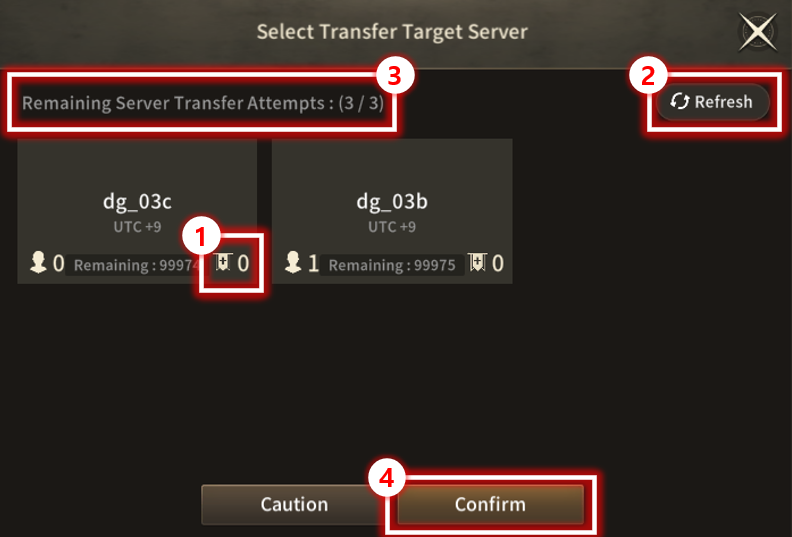
| ■ Guild Server Transfer Status |
- Can be checked through [Server Transfer Ticket] product's magnifying glass at shop.
| No. | Category | Details |
| 1 | Server List | Displays list of servers available for transfer. Displays remaining available No. of Adventurers for Server Transfer. Displays number of guilds in the Server. |
| 2 | Refresh | Button to refresh the server list for Server Transfer. |
| 3 | Server Transfer Count | Displays remaining count for Server Transfer. |
| 4 | Cautions | Guild leader's current server characters and guild on hold transfer to the target server. Displays Guild Server Transfer Cautions with a pop-up window. 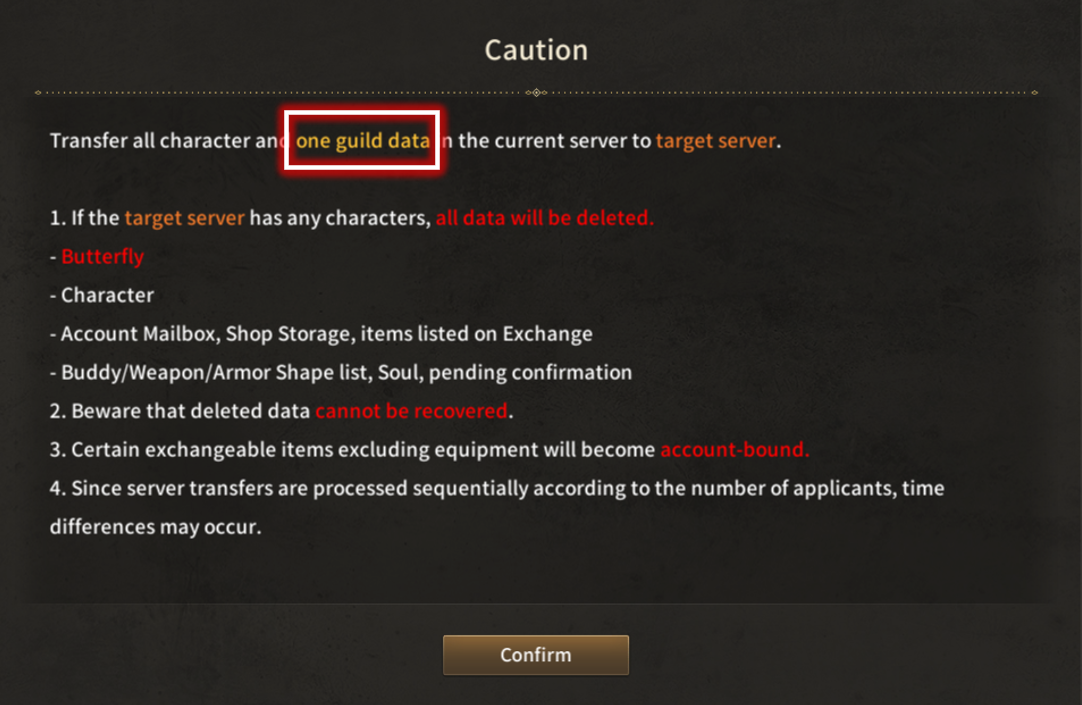 ※ Cautions - All Character data in the target server of Server Transfer will be deleted. This includes the target server's :
- Guild of over LV. 3 is needed. - Exchangeable Unbound items excluding equipment will be changed to Account Bound items. - Server Transfer is conducted sequentially according to confirmation, and takes time to be conducted. - All Guild Members automatically leave on transfer, but guild re-join/create penalty is not applied to the members. |
| ■ Guild Server Transfer Requirements |
- The UI shows list of requirements for Server Transfer on use.
- Guild Conditions are added/changed compared to previous Character Server Transfer.
| No. | Confirm List | Details |
| 1 | Guild Manager (Current Character) |
- Guild Leader can only use the Guild Server Transfer item. - Guild Leader needs to have guild over LV. 3. |
| 2 | Guild Cleanup | - Another character of same account as the guild leader character using the item cannot hold or join a guild.
|
| 2 | Exchange (All Characters on the Server) |
- Server Transfer is unavailable if there are items registered for sale, or have unsettled items on exchange. |
| 3 | Character Location (Current Character) |
- Server Transfer is unavailable if current Character is located in Arena, Dungeon, Valhalla, etc. |
| 4 | Safe Zone (Current Character) |
- Server Transfer is unavailable if current Character is not located in Safe Zone. |
| 5 | Server Transfer Count (Account) |
- Server Transfer is unavailable if there is no remaining Transfer Count or is in Transfer Cooldown. - Shares the count with Character Server Transfer. |
| ■ Guild Server Select & Transfer |
| No. | Category | Details |
| 1 | Server Select | Select from list of servers available for transfer. Displays remaining available No. of Adventurers for Server Transfer. Displays number of guilds in the Server. |
| 2 | Refresh | Button to refresh the server list for Server Transfer. |
| 3 | Server Transfer Count | Displays remaining count for Server Transfer. |
| 4 | Server Transfer | Moves to final step of Server Transfer after pressing Confirm. Displays Server Transfer Cautions with Final Confirmation pop-up window. Guild leader's current server characters and guild on hold transfer to the target server. Guild of over LV. 3 is needed. 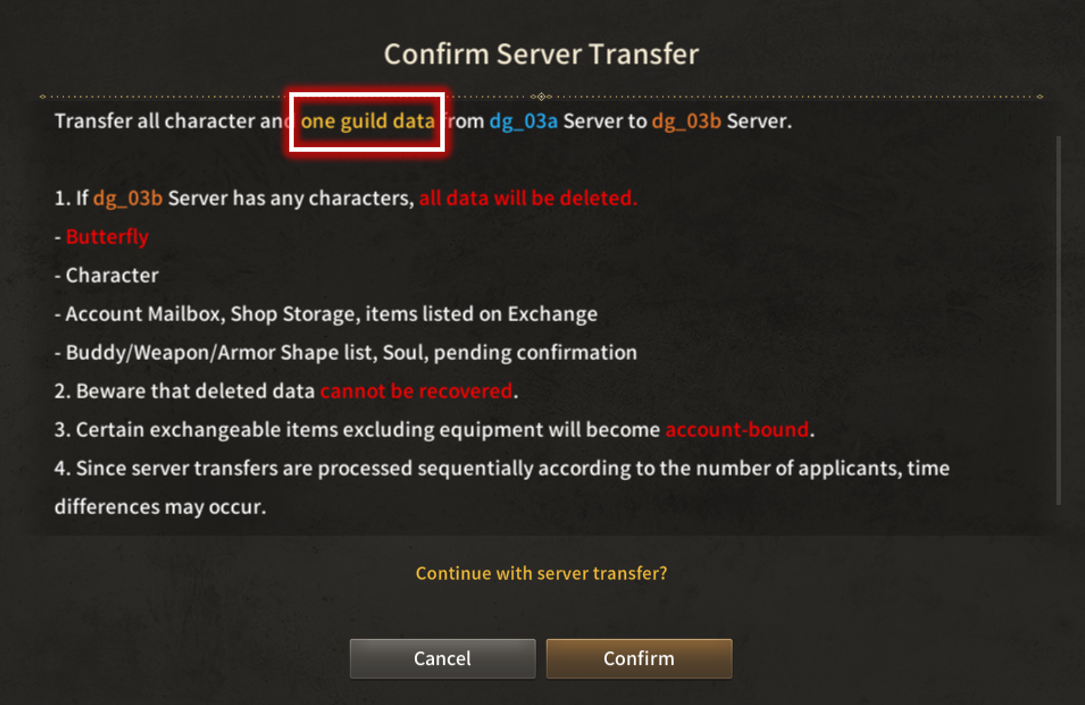 |
| ■ Guild Server Transfer Requirements |
| Type | Transfer Target | Transferrable |
|---|---|---|
| Guild Information | Guild Level | O |
| Guild Mark | O | |
| Guild Name | O | |
| Guild Intro | O | |
| Guild Notice | O | |
| Guild Buff | O | |
| Guild Name Change Fee | O | |
| Guild Relations | X | |
| Guild Donation | Gold Daily Donation (Daily Donation History and Number) |
O |
| Butterfly Daily Donation (Daily Donation History and Number) |
O | |
| Guild Manage | Guild Members (List, Memo, Weekly Score) |
X |
| Join Request | X | |
| Hostiles | X | |
| Allies | X | |
| Guild History | O | |
| Activity | X | |
| Currency Flow | X | |
| Guild Content | Guild Raid (Open Status, Daily Summon Number, Additional Summon Number) |
O |
| Guild Hunting Grounds (Open Status, Remaining Recharged Time) ※ Recharged Time status appears as used for Guild Leader, and Time resets on new join for automatically left Guild members |
O | |
| Guild Raid (Open Status, Achievement Status) |
O | |
| Guild Craft | Boss Binding Stone | X |
| Guild Mission | Mission List (Open Status) |
O |
| Mission in Progress (Progress Status, Pending Completion) |
O | |
| Guild Storage | Item List | O |
| Award | X | |
| Rank - Guild | Guild CP | X |
| Scramble | Territory (Changes to 'Unoccupied' status when Siege Guild transfers) |
X |
| Past Result (Remains in the previous Server) |
X | |
| Apply (Excluded in Applied Guild, and Apply Number restored if during Apply period) |
X | |
| World Scramble | Apply (Guild Server Transfer unavailable on Participation list confirm) |
X |
Character Server Transfer
| ■ Server Transfer |
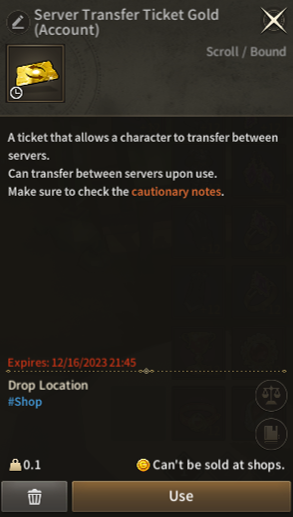
[Server Transfer Ticket] may be used to conduct Server Transfer.
Server Transfer Schedule: Please refer to relevant Notice for detailed Schedule.
※ Server Transfer Schedule/Condition can be modified occasionally.
Server Transfer is a function that transfers All Character data from one server to another.
※ Server Transfer is only available in the same region (ex A1->A4 is possible, but A1->K1 is impossible)
| ■ How to Purchase |

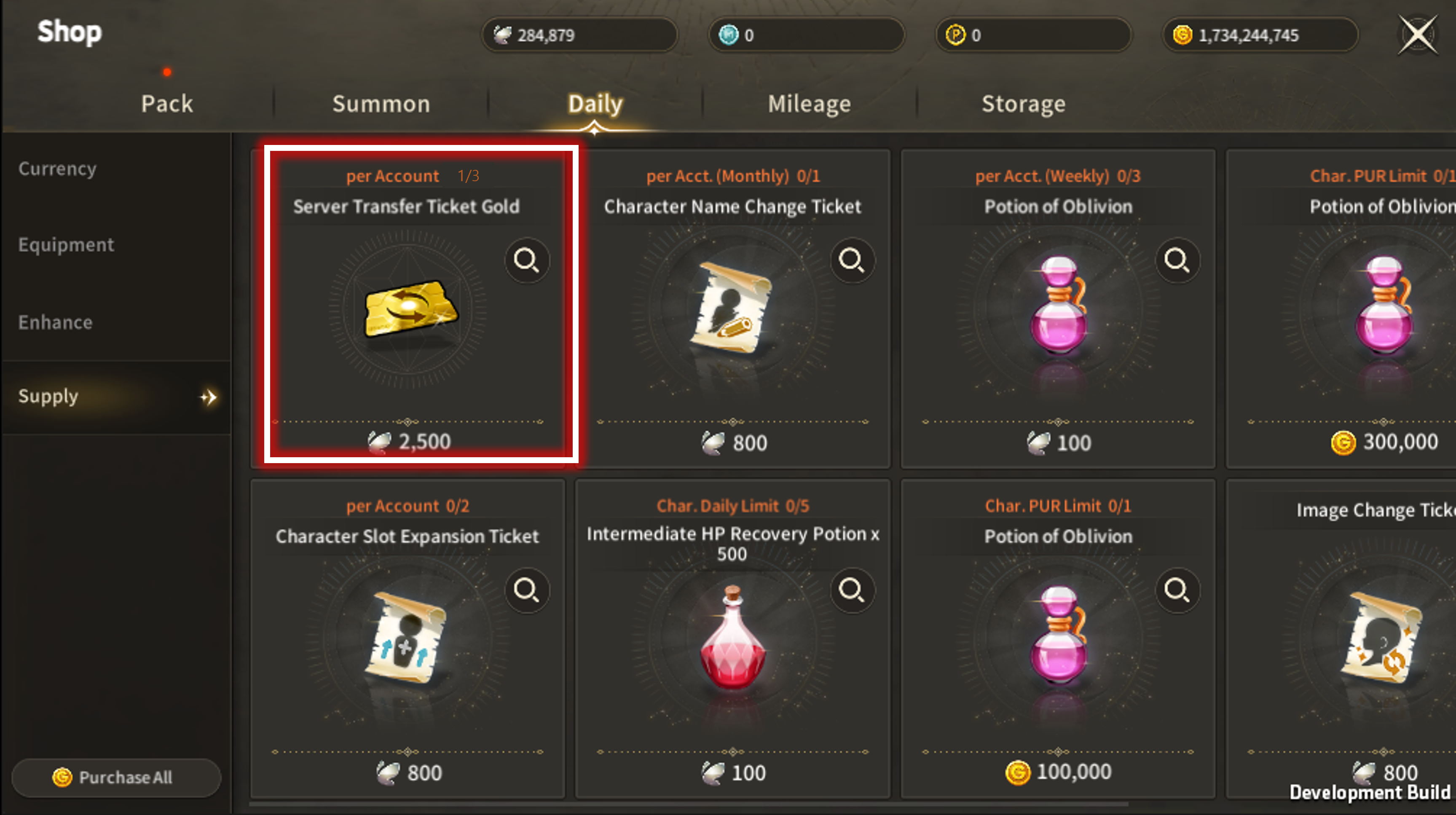
Click on [Shop] - [Daily] - [Supply] to purchase [Server Transfer Ticket Gold]
| ■ Server Transfer Ticket |
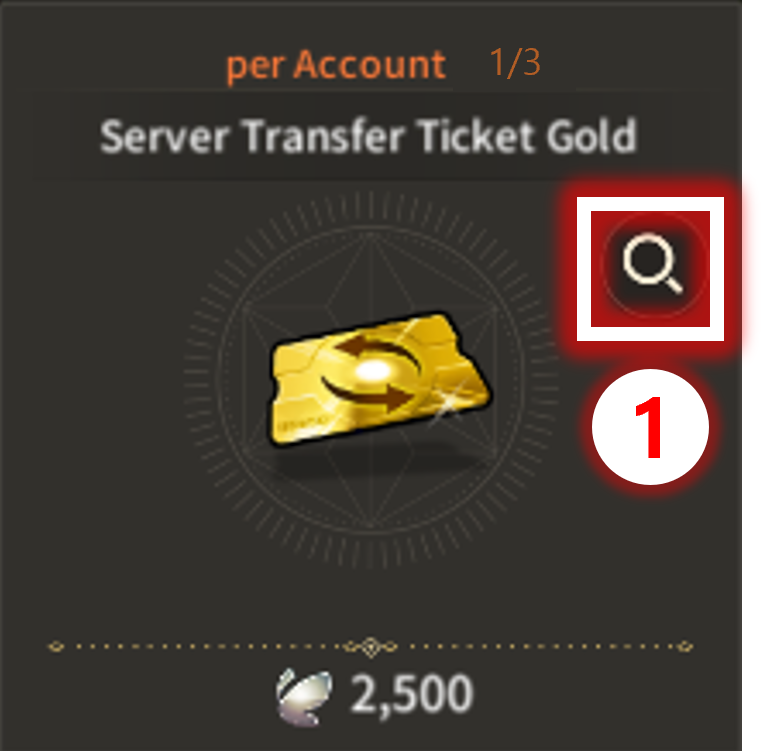
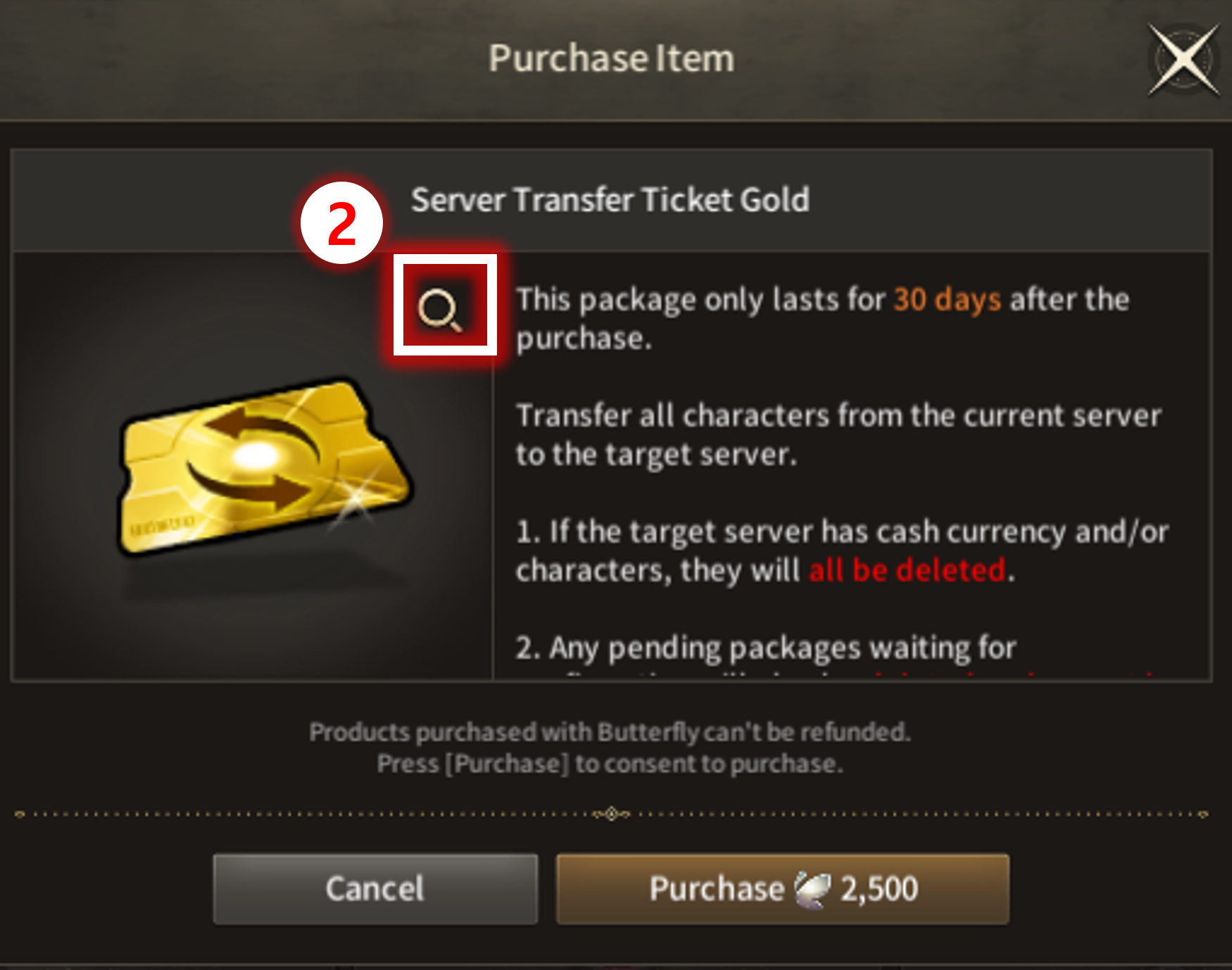
| No | Category | Details |
| 1 | Product Details | Product Details of [Server Transfer Ticket]. Includes Cautions related to Server Transfer. Click on the Magnifying Glass icon to check Server Transfer Status. |
| 2 | Server Transfer Status | UI to check Server Transfer Status. Shows list of transferrable servers depending on the Server Transfer Status. |
Adventurers must Complete Quest:[Main][Chapter 2]7-23. Lustful Desert King to purchase and use Server Transfer Ticket.
30 days of expiration on the item is applied on purchase of the ticket.
| ■ Server Transfer Status |
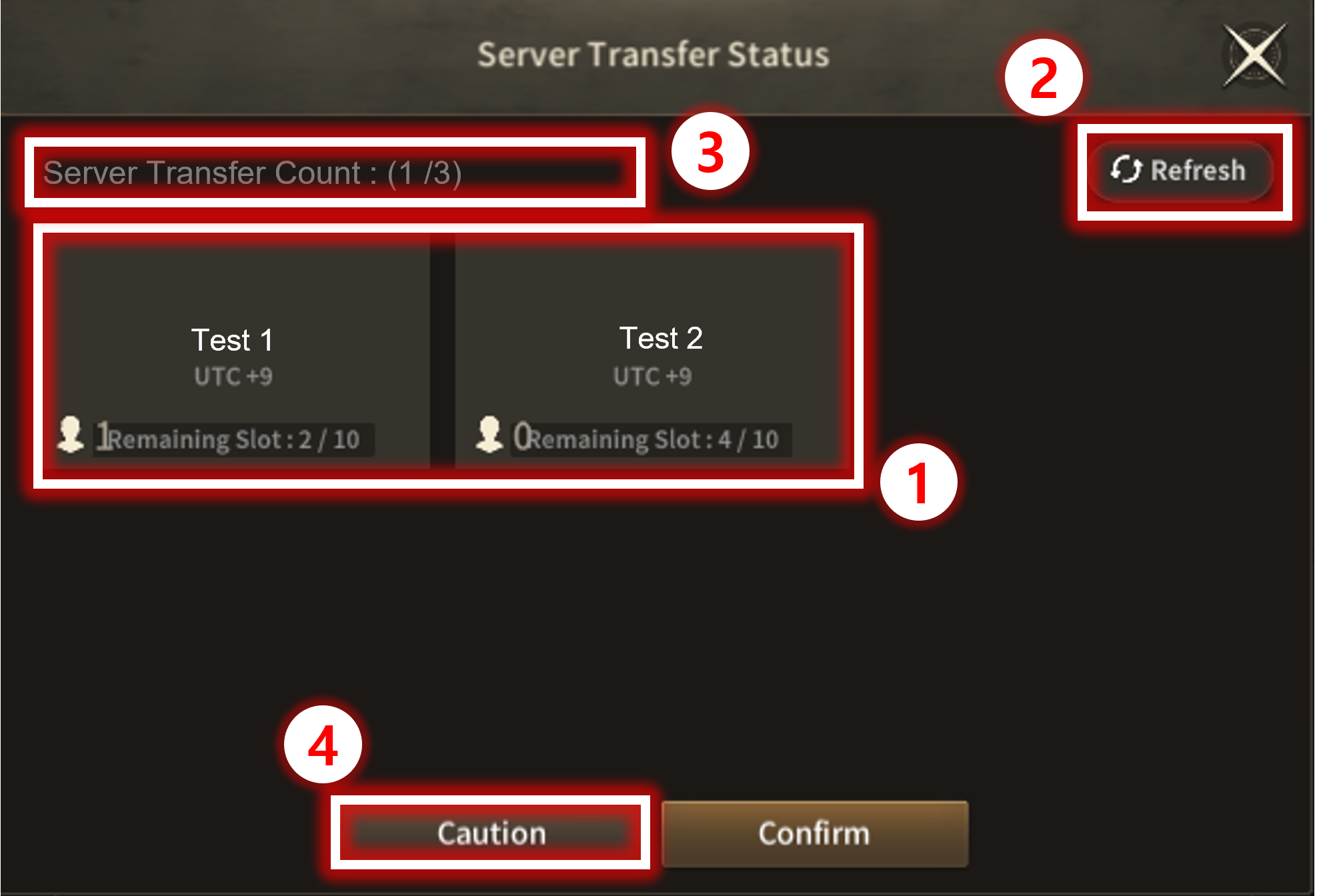
| No. | Category | Details |
| 1 | Server List | Displays list of servers available for transfer. Displays remaining available No. of Adventurers for Server Transfer. Displays number of characters in the Server. |
| 2 | Refresh | Button to refresh the server list for Server Transfer. |
| 3 | Server Transfer Count | Displays remaining count for Server Transfer. |
| 4 | Cautions | Displays Server Transfer Cautions with a pop-up window.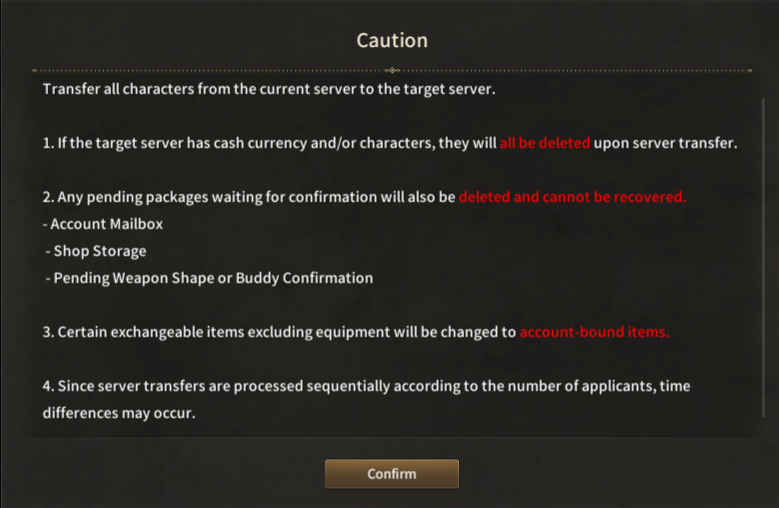 ※ Cautions
|
| ■ Server Transfer Requirements |
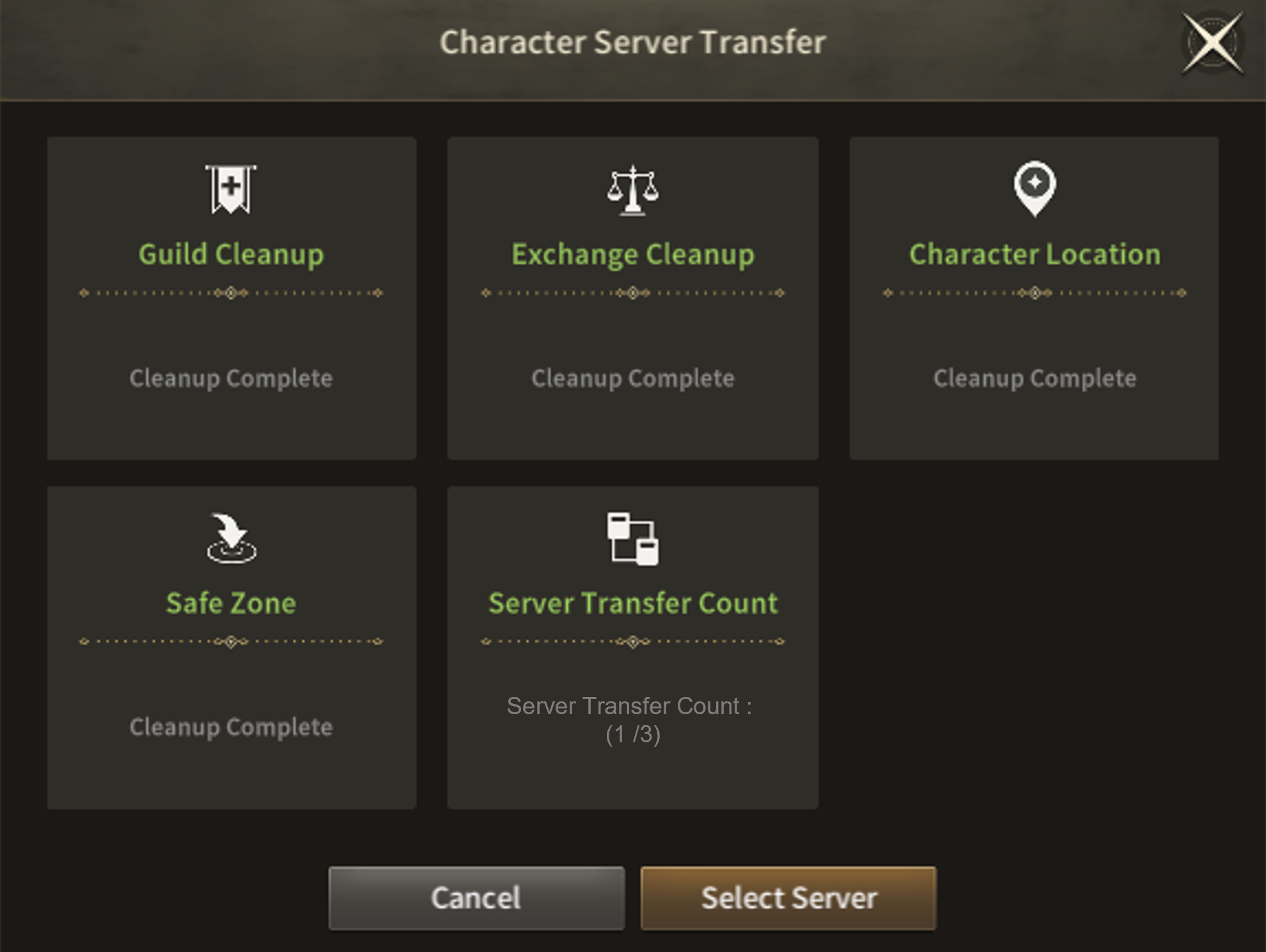
The UI shows list of requirements for Server Transfer when used.
| No. | Confirm List | Details |
| 1 | Guild (All Characters on the Server) |
If any Characters on the server is a Guild Leader, Guild Member, or applying to enter the Guild, Server Transfer is unavailable. |
| 2 | Exchange (All Characters on the Server) |
Server Transfer is unavailable if there are items registered for sale, or have unsettled items on exchange. |
| 3 | Character Location (Current Character) |
Server Transfer is unavailable if current Character is located in Arena, Dungeon, Valhalla, etc. |
| 4 | Safe Zone (Current Character) |
Server Transfer is unavailable if current Character is not located in Safe Zone. |
| 5 | Server Transfer Count (Account) |
Server Transfer is unavailable if there is no remaining Transfer Count or is in Transfer Cooldown. |
| ■ Server Select & Transfer |
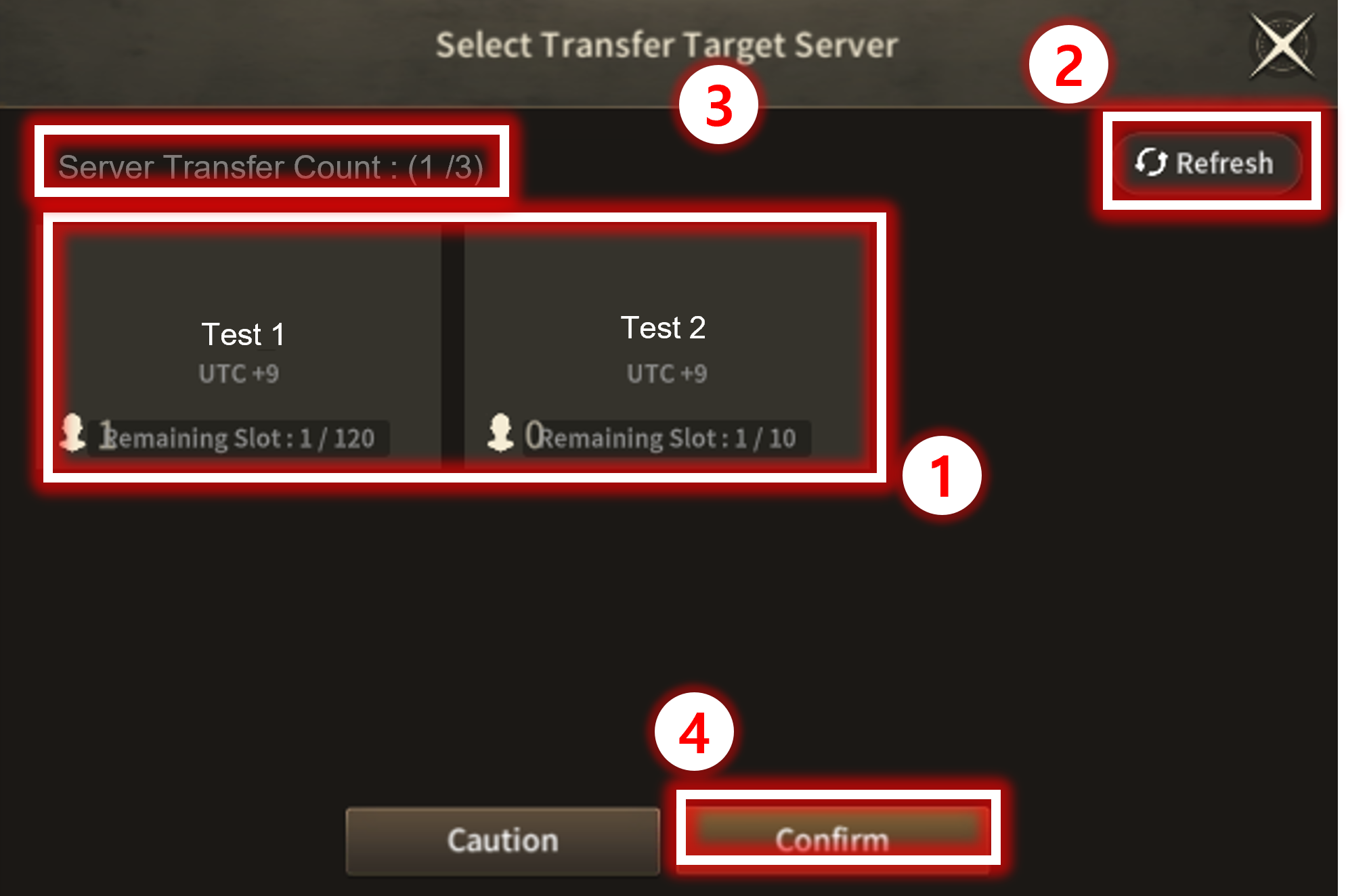
| No. | Category | Details |
| 1 | Server Select | Select from list of servers available for transfer. Displays remaining available No. of Adventurers for Server Transfer. Displays number of characters in the Server. |
| 2 | Refresh | Button to refresh the server list for Server Transfer. |
| 3 | Server Transfer Count | Displays remaining count for Server Transfer. |
| 4 | Server Transfer | Moves to final step of Server Transfer after pressing Confirm. Displays Server Transfer Cautions with Final Confirmation pop-up window.  |
| ■ Server Transfer Requirements |
| Type | Transfer Target | Transferrable |
| Currency | Gold | O |
| Butterfly | O | |
| Guild Insignia, Order Accomplishment, Kingdom Token | O | |
| Character | Image, Name, Level, CP, Stats | O |
| Equipped Equipment (Preset Included) ※ Enhance Level, Polish Included |
O | |
| Item Quick-Slot Status | O | |
| Skill Quick-Slot Status | O | |
| Title Status | O | |
| Buffs ※ Currently Applied Only |
O | |
| Recoverable EXP (Free, Paid) | O | |
| Open Character Slots | O | |
| Pending Deletion Character | O | |
| Skills | Learnt Skills | O |
| Skill Level | O | |
| Bag | Expanded Bag Slots | O |
| Items ※ Some Unbound items will be Account Bound |
O | |
| Common Storage | Expanded Slots | O |
| Items | O | |
| Buddy / Weapon Shapes | Acquired Buddy/Shapes List | O |
| Buddy/Shapes Fuse List (Souls) | O | |
| Confirm List | O | |
| Sculptures | Acquired Sculptures | O |
| Display Expansion Slots | O | |
| Equipment Status | O | |
| Monster Cards | Acquired Cards | O |
| Expansion Slots | O | |
| Equipped Status | O | |
| Enhance Level | O | |
| Exchange | Trade History | X |
| Favorite List | X | |
| Guild | Guild | X |
| Re-Join Penalty | X | |
| Create Guild Penalty | X | |
| Craft | Craft Level & EXP | O |
| Collection Book | Collection Book Status | O |
| Favorites | O | |
| Codex | All | O |
| Quest | All | O |
| Request | All | O |
| Achievement | All | O |
| Rank | Level, CP, Guild CP ※ Re-calculated at transferred Server |
X |
| Dungeon | All | O |
| Raid | All | O |
| Arena | Achievement Reward | O |
| Current Point, Season Point, Current Rank, Season Rank, Arena History | X | |
| Valhalla | Server Rank, Guild Rank | X |
| PK Records | Common Records | X |
| World Content Record | O | |
| Fame | Fame Point, Status | O |
| Monster Mileage | Status | O |
| Follow Player | All | X |
| Chat | Emoticon | O |
| Event | All | O |
| Shop | All | O |
※ This guide was produced under test environment.
※Impersonating Character Name used in the guide can lead to account sanction.
-
 System[Game-Guide] Monster Card & Equipment Recovery / Refusion Ticket2024-06-03
 -
 System[Game-Guide] Damage Skin2025-01-08
 -
 System[Game-Guide] Exchange2024-05-01
 -
 System[Game-Guide] Convenience2024-10-16
 -
 System[Game-Guide] Bag and Equip2023-11-02
 -
 System[Game-Guide] Village2023-11-07
 -
 System[Game-Guide] Follow and Block2023-11-07
 -
 System[Game-Guide] Mail2023-11-07
 -
 System[Game-Guide] Rank2023-11-07
 -
 System[Game-Guide] Map2023-11-07
 -
 System[Game-Guide] Alchemy2024-06-26
 -
 System[Game-Guide] Server Transfer2024-08-01
